• Skip to main content
  • Skip to secondary menu
  • Skip to primary sidebar
  • Skip to footer
  • PSD to Genesis
  • Personalized Genesis Child Theme
  • Custom Website
  • Rainmaker
  • Genesis Customizations

Christoph Herr

Solutions For Your Online Business

  • Home
  • Articles
  • Recommendations
  • About
  • Praise
  • Contact
  • Schedule a Call

How to use remove_actions in a plugin

Last updated on April 10, 2015 by Christoph Herr 1 Comment

Over the last day or two I followed a conversation about the pros and cons of including theme adjustments  in the functions.php of the theme or using a plugin to store the adjustments.

So far I have only use the functions.php; however, I can see that using a plugin can have its benefits.

One of my friends started to store his adjustments in a plugin. He progressed nicely but wondered why repositioning the primary navigation in the Genesis Sample Theme resulted in the primary navigation showing up twice: in its original and the new position.

Here is the code, straight from Studiopress. Please remember this is about using the code in a plugin.

<?php
//* Do NOT include the opening php tag

//* Reposition the primary navigation menu
remove_action( 'genesis_after_header', 'genesis_do_nav' );
add_action( 'genesis_before_header', 'genesis_do_nav' ); 

Here is the result:
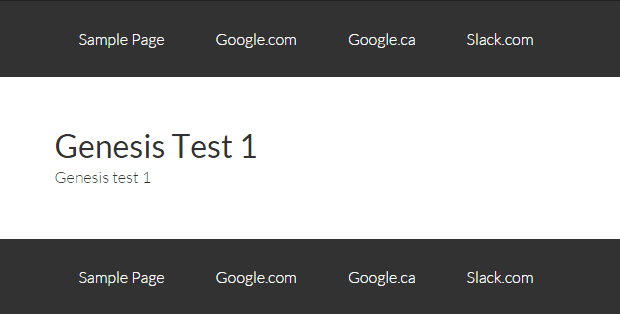
Two Primary Navigations
We were stumped and started looking for a solution.

I found a clue as to what might be going on in an old posting by Rarst. In short, he said that the remove_action has to be wrapped in a function.

So we tried the following code:

<?php
// Do NOT include the opening php tag

// This removes the primary navigation from its original place
add_action( 'get_header', 'ch_remove_primary_nav');
function ch_remove_primary_nav () {
remove_action( 'genesis_after_header', 'genesis_do_nav');
}

// This adds the primary navigation to a new place
add_action( 'genesis_before_header', 'genesis_do_nav');

And this was the result:
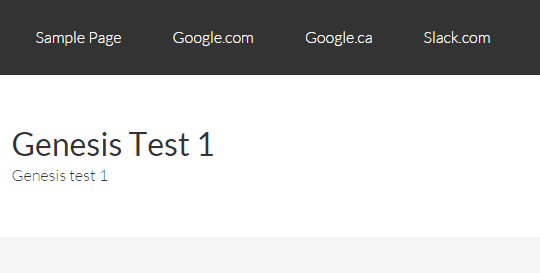
Repositioned Primary Navigation code in plugin
Mystery solved.

To get a remove_action to work in a plugin, wrap it in a function.

I have to admit it seems a bit odd to have to use an add_action to remove something. Things like this can make your head hurt… But that´s just the way programming logic works sometimes.

I want to mention one more time, that all of this is not needed when writing the code straight into the functions.php.

Thanks to Glenn Dixon for inspiring this post.

Share this:

Share on X (Twitter)Share on FacebookShare on PinterestShare on LinkedInShare on Email

Filed Under: Code Snippets

Reader Interactions

Trackbacks

  1. Sample code for a plugin to store functions in - Christoph Herr says:
    October 18, 2015 at 3:49 pm

    […] Two days ago I wrote about how to use remove_actions in a plugin. […]

    Reply

Leave a Reply to Sample code for a plugin to store functions in - Christoph Herr Cancel reply

Your email address will not be published. Required fields are marked *

Primary Sidebar

Getresponse Email Marketing WordPress Speed Test

Subscribe to my newsletter

Please enter your information here:

I hate spam. Your information is save.

Latest Posts

WordPress Black Friday & Cyber Monday Deals

Once again it´s time for WordPress Black Friday & Cyber Monday Deals. Like last year, I have … [Read More...] about WordPress Black Friday & Cyber Monday Deals

Cafe Pro - sticky menu and image logo - end result

Add a logo to the sticky menu of Cafe Pro

A member of the Studiopress forum asked how to show a logo in the after header menu (primary … [Read More...] about Add a logo to the sticky menu of Cafe Pro

Smart Passive Income Pro screenshot

Remove the featured image from the homepage of Smart Passive Income Pro

Studiopress just released a new child theme for the Genesis Framework, called Smart Passive Income … [Read More...] about Remove the featured image from the homepage of Smart Passive Income Pro

Footer

StudioPress Theme of the Month

Copyright © 2025 · Magazine Pro Theme On Genesis Framework · WordPress · Log in