• Skip to main content
  • Skip to secondary menu
  • Skip to primary sidebar
  • Skip to footer
  • PSD to Genesis
  • Personalized Genesis Child Theme
  • Custom Website
  • Rainmaker
  • Genesis Customizations

Christoph Herr

Solutions For Your Online Business

  • Home
  • Articles
  • Recommendations
  • About
  • Praise
  • Contact
  • Schedule a Call

Removing the post info from Whitespace Pro

Last updated on June 24, 2016 by Christoph Herr 1 Comment

In the Genesis Framework the post info can usually be removed by using this code snippet from http://my.studiopress.com/snippets/entry-header/

remove_action( 'genesis_entry_header', 'genesis_post_info', 12 );

The Whitespace Pro theme, however, represents a little exception.
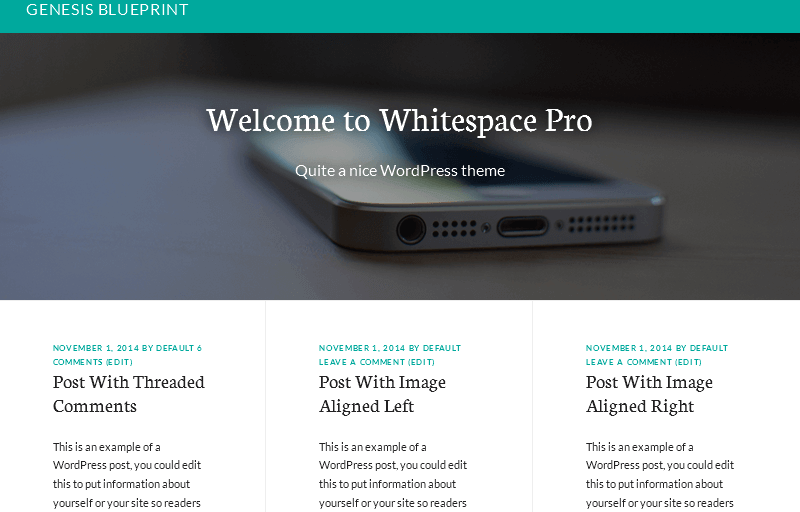
whitespace_pro

The Whitespace Pro functions.php file is repositioning the entry meta with a priority of 7.

This means that the usual code snippet cannot work.

Luckily the solution is very simple.

Just change the priority in the code snippet:

remove_action( 'genesis_entry_header', 'genesis_post_info', 7 );
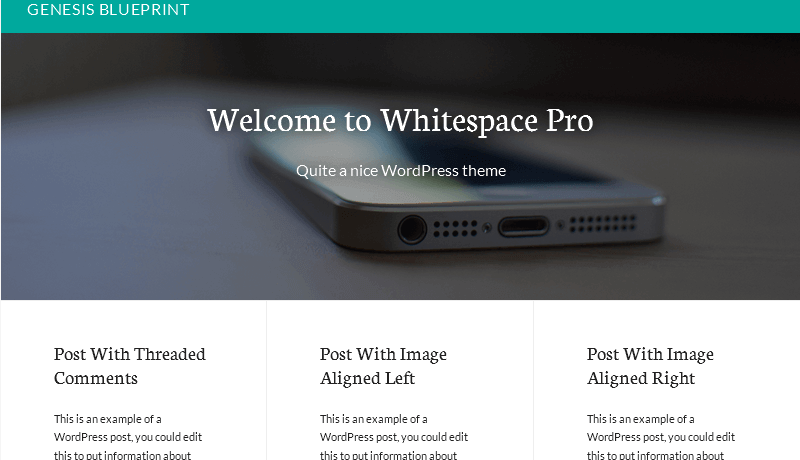
whitespace_pro_post_info_removed

Share this:

Share on X (Twitter)Share on FacebookShare on PinterestShare on LinkedInShare on Email

Filed Under: Code Snippets Tagged With: Whitespace Pro

Reader Interactions

Trackbacks

  1. Removing the post info from the Whitespace Pro front page - Christoph Herr says:
    June 24, 2016 at 3:40 pm

    […] a recent post I showed how to remove the post info from all posts and archive pages in Whitespace […]

    Reply

Leave a Reply to Removing the post info from the Whitespace Pro front page - Christoph Herr Cancel reply

Your email address will not be published. Required fields are marked *

Primary Sidebar

Getresponse Email Marketing WordPress Speed Test

Subscribe to my newsletter

Please enter your information here:

I hate spam. Your information is save.

Latest Posts

WordPress Black Friday & Cyber Monday Deals

Once again it´s time for WordPress Black Friday & Cyber Monday Deals. Like last year, I have … [Read More...] about WordPress Black Friday & Cyber Monday Deals

Cafe Pro - sticky menu and image logo - end result

Add a logo to the sticky menu of Cafe Pro

A member of the Studiopress forum asked how to show a logo in the after header menu (primary … [Read More...] about Add a logo to the sticky menu of Cafe Pro

Smart Passive Income Pro screenshot

Remove the featured image from the homepage of Smart Passive Income Pro

Studiopress just released a new child theme for the Genesis Framework, called Smart Passive Income … [Read More...] about Remove the featured image from the homepage of Smart Passive Income Pro

Footer

StudioPress Theme of the Month

Copyright © 2025 · Magazine Pro Theme On Genesis Framework · WordPress · Log in